Wednesday, May 17, 2017
Unix sed, Python CsvKit under Windows Scripting Host (WSH); Problems and solutions
This is a just a short article that described problem and finding I encountered in one of my project and were wishing that what I found can be useful to someone following a similar path as me - A short side track: Nerds or people like me working and sharing knowledge, a lot of times, were overlooked as been anti-social and less of charity or volunteering to the society. I for one, would like to pass and dispatch the messages that we, the nerd and genuine hard worker, are to be proud of our contribution to the society and world for making the world a better place.
Back to the topic.
I were involved in a Windows automation project and were writing most of my code in VBA. However, with my knowledge about the Unix way of doing things, it makes totally sense for me wanting to run some tasks through some Unix utilities program. As we all know, Unix way basically means command lines. Fortunately, Windows did not fore go the access to command lines. For VBA, there are the general Shell() command. But that is not the only option for VBA. With Microsoft COM infrastructure, VBA programmer has access to wide variety of objects. One of them is the Windows Scripting Host. By accessing to Windows Scripting Host, programmer can have better control of the DOS-shell/command-line environment.
While I was happily using the Windows Scripting Host to carry out my command line tasks, I notice that for most Windows/DOS based programs they all run great until I try to run some Unix utilities that were ported over to the Windows/DOS world.
Before I go on, I would like to point out that I did not spend a lot of time trying to figure out every single issues, so please bear with me for not be able to provide all possible solutions and explanations.
One Unix utility I used is the sed command from the MinGW/msys. I was able to verify its functionality by running some test directly under the Windows/DOS command line after removing some conflicting search paths from the PATH environment variables - for example, in my system, I also have Qt and GNAT installed.
After verifying the sed under that Windows/DOS command line, I invoked it through the Windows Scripting Host via VBA. The command failed with a return code of 2, which, for sed, could just mean errors during execution or , for DOS, could mean file not found. By testing with non-existing command, we know the Windows Scripting Host do recognize the sed command. By testing with simple 'sed -help 2>file', I realize it may have something to do with the shall's interpretation/parsing of command line. This lead me to the thought of using the Cmd.exe /C to run the sed. By running 'Cmd.exe /C sed ... ' under the Windows Scripting Host, everything worked out. The other command I run into the same problem is the Python CsvKit commands. Again, running with Cmd.exe solve the problem. At this point, I can't say I understand the problem. My hint is that it may have something to do with the redirection of the standard output since all my Unix and Python commands used the redirection.

Monday, March 20, 2017
A better replication function:rep() for R
This article is to propose a new approach to the R replication function rep(). At this point, I am not fluent in creating R packages and would not, for a while, create the package even though I will try to provide the code I have in mind.
First of all, let's review the current implementation of the R replication function rep() in my own words:
rep(Vctr,times=Vctr1,each=n,length.out=N)
Vctr1= 5 := c(5, 5, 5, ...).
With this equivalency, I also like to propose the switch the meaning of 'times' and 'each' so that the 'each' now describes how many times each of the elements in Vctr should be repeated. With the meaning of the new 'each' been settled, we should now reconsider the meaning of the new 'times'.
The newly proposed meaning for 'times' will be the times to repeat the sequence generated by the 'each'. The new meaning for length.out would be designated as the maximum length of the eventual output.
With the proposed changes outlined above, here are few examples to demonstrate the new new-rep() function.
>new-rep(1:5,each=2,times=1,length.out=13)
[1] 1 1 2 2 3 3 4 4 5 5
>new-rep(1:5,each=2,times=2,length.out=13)
[1] 1 1 2 2 3 3 4 4 5 5 1 1 2
>new-rep(1:5,each=c(1,2,3,2,1),times=1,length.out=13)
[1] 1 2 2 3 3 3 4 4 5
>new-rep(1:5,each=c(1,2,3,2,1),times=2,length.out=13)
[1] 1 2 2 3 3 3 4 4 5 1 2 2 3
Can we create all that can be done with the old rep() function? - yes!
Can we create something that is not possible to create with the old rep() function? - yes
Possible algorithm:
First of all, let's review the current implementation of the R replication function rep() in my own words:
rep(Vctr,times=Vctr1,each=n,length.out=N)
Each element in Vctr is repeat n times if Vctr1 do not exist. Otherwise, the times each element is repeated is specified by Vctr1. However, if times is a number, the Vctr is repeated that number of times. length.out disregard times, each element is repeated n times and repeated again until length.out is reached.From my description above, I see that when 'times' is a vector, its elements controls how the corresponding element in Vctr are repeated. But not when 'times' is degraded to a number - it then control the number of times the 'Vctr' is repeated. On the other hand, the 'each', as a number, it also controls the number of times each element in Vctr are repeated. With these info, it just logical for me to want to reconsider the situation when 'times' is just a number. It just seems more logical to me to consider this as a special case where all elements in Vctr are to be repeated the same amount of 'times'. i.e.
Vctr1= 5 := c(5, 5, 5, ...).
With this equivalency, I also like to propose the switch the meaning of 'times' and 'each' so that the 'each' now describes how many times each of the elements in Vctr should be repeated. With the meaning of the new 'each' been settled, we should now reconsider the meaning of the new 'times'.
The newly proposed meaning for 'times' will be the times to repeat the sequence generated by the 'each'. The new meaning for length.out would be designated as the maximum length of the eventual output.
With the proposed changes outlined above, here are few examples to demonstrate the new new-rep() function.
>new-rep(1:5,each=2,times=1,length.out=13)
[1] 1 1 2 2 3 3 4 4 5 5
>new-rep(1:5,each=2,times=2,length.out=13)
[1] 1 1 2 2 3 3 4 4 5 5 1 1 2
>new-rep(1:5,each=c(1,2,3,2,1),times=1,length.out=13)
[1] 1 2 2 3 3 3 4 4 5
>new-rep(1:5,each=c(1,2,3,2,1),times=2,length.out=13)
[1] 1 2 2 3 3 3 4 4 5 1 2 2 3
Can we create all that can be done with the old rep() function? - yes!
Can we create something that is not possible to create with the old rep() function? - yes
Possible algorithm:
new-rep <- function (Vctr,each,times,length.out) {
    if length(each)==1 { # if each exist and just a number
        each <- rep(each,times=length(Vctr))  # expand each
    }
    Rslt <- rep(Vctr, times=each);
    Rslt <- rep(Rslt, times=times);
    Lngth <- length(Rslt);
    if (is.numeric(length.out))  {
     if (length.out&tl;Lngth) Lngth <- length.out;
    }
    Rslt[1:Lngth];
}
Appreciate your thoughts and possible creation of package.
Wednesday, March 30, 2016
Labels for ACS Pums csv download - Data Ferrett to the rescure
US Census Bureau conducts the American Community Survey (ACS) annually. One of the data product that made available to the public is the Public Use Microdata Sample (PUMS) data, that can be used by researchers to derive statistical results.
The PUMS data were made available in two formats: SAS and CSV file format. The SAS file format is a proprietary file format and contains long text that give meaning to shortened mnemonic for variables and categorical values. The CSV file format, on the other hand, is supported by almost all software but does not contain helping texts. US Census Bureau does provide document in pdf or text format that describes the mnemonics used. However, the pdf and the text format isn't the easiest to use for statistical software.
Personally, I believe the XML format is ideal to store the description info for mnemonics and I have suggested this approach to ACS help group. In the mean time, I discovered that the Data Ferrett application provided by the Census Bureau can serve as an alternative source for the XML file. By selecting all variables using the Data Ferrett and save the session to a local file, you obtained an XML file that contains the descriptions and the mnemonics.
By using XSLT, people can easily construct statements that, when run by statistical software, will assign descriptions to mnemonics.
* A side note, at this point, the XML file generated by the Data Ferrett isn't perfect. The & sing isn't correctly coded accounting to XML standard and some XSLT software may complain about the file. This, however, can easily corrected by search and replace the & sign.
Tuesday, September 29, 2015
UI Design for Viewing Data - Relate Table to Chart
User Interface Design is always an innovation art. It connects human behavior with icy cold machine code.
In the world of data analysis, charts and tables are gateways to human. Charts communicate size and quantities to human via human's natural perception of the world. However, when multiple facets of data are presented, relating size and quantities to facets becoming a burden to human. Tables, on the other hand, relate multiple faceted data in concise form to human sacrificing the advantage of human's natural perceptions for size and quantities.
The proposed user interface design is based on the above observations about tables and charts. The interface begin by presenting a data table to user with the associate charts: (Two flavor of charts are presented - vertical and horizontal bar)


It is obvious that these charts are difficult to comprehend with the mixed facets of institutional and sectional totals. The idea behind the design, however, is to provide user with channel tools that can channel desired data to the the chart. Various ways can be used to select the desired data. For example, using drop-down list, checkboxes in context menu, or text/regular-expression based filtering to channel the desired data. Visual feedback can be provided to user by hiding or highlighting the data table. Possible filtering results are presented below:


In the world of data analysis, charts and tables are gateways to human. Charts communicate size and quantities to human via human's natural perception of the world. However, when multiple facets of data are presented, relating size and quantities to facets becoming a burden to human. Tables, on the other hand, relate multiple faceted data in concise form to human sacrificing the advantage of human's natural perceptions for size and quantities.
The proposed user interface design is based on the above observations about tables and charts. The interface begin by presenting a data table to user with the associate charts: (Two flavor of charts are presented - vertical and horizontal bar)
| Inst. | Men | Women | Total |
| Univ | 14,059 | 15,407 | 29,466 |
| NCTA | 97 | 102 | 199 |
| UNK | 1,876 | 2,406 | 4,282 |
| UNL | 8,059 | 7,588 | 15,647 |
| UNMC | 758 | 1,387 | 2,145 |
| UNO | 3,269 | 3,924 | 7,193 |
| Stat Col. | 2,020 | 2,727 | 4,747 |
| CSC | 660 | 941 | 1,601 |
| PSC | 350 | 446 | 796 |
| WSC | 1,010 | 1,340 | 2,350 |
| Comm. Col. | 6,619 | 7,095 | 13,714 |
| CCC | 822 | 1,171 | 1,993 |
| MCC | 1,594 | 1,945 | 3,539 |


It is obvious that these charts are difficult to comprehend with the mixed facets of institutional and sectional totals. The idea behind the design, however, is to provide user with channel tools that can channel desired data to the the chart. Various ways can be used to select the desired data. For example, using drop-down list, checkboxes in context menu, or text/regular-expression based filtering to channel the desired data. Visual feedback can be provided to user by hiding or highlighting the data table. Possible filtering results are presented below:


Monday, July 27, 2015
Microsoft OUTLOOK Recurring Event ACCESS VBA code
Microsoft Outlook provides a nice calendar program that allows people to track events. The Outlook, like all other components in the Microsoft Office suite, also provides program interfaces (API) for programmer to extend their use of the program.
In our office, we try to pull these info into our databases. For normal events, the code is straightforward since it is stored in a day by day basis. For recurring events, however, in practical, it can't be stored in a day by day basis since some recurring events don't have an end day. This, therefore, presents a challenge when try to pull in calendar events on a day by day basis. Basically, the program need to go through each recurring event and, based on the pattern of each recurring event, generates the day and time of each occurrences and find out if any of the occurrences fall inside the specific time period of interest.
Below are codes that I devised and I hope it is of value to someone - please provide adequate credit statement if you do adopt and find the code useful.
Few words about the program:
- xCDO is an object that provides access to database.
- PrmtrTyp, Prmtr are just for me to extend code in the future. 1 and "" are normally used.
- BgnDt, and EndDt specify the period of interest.
- xAppntmnt is the Appointment object of Outlook.
- xHC is simply my version of the VBA collection object. It allows to set entries via StItm() function and retrieve value via RdItm() function.
- The handling of yearly recurring events is to be amended.
Public Function DoRecrrngs(aCDO, BgnDt, EndDt, aAppntmnts, Ppl, PrmtrTyp, Prmtr)
Dim status, oAppntmnt, oPttrn
Dim oHC As New HCllctn
For Each oAppntmnt In aAppntmnts
Set oPttrn = oAppntmnt.GetRecurrencePattern
If oPttrn.PatternEndDate >= BgnDt Then
status = oHC.StItm("BgnDt", BgnDt)
status = oHC.StItm("EndDt", EndDt)
status = oHC.StItm("IsAllDy", oAppntmnt.AllDayEvent)
status = oHC.StItm("EvntTtl", oAppntmnt.Subject)
status = oHC.StItm("EvntDtl", oAppntmnt.Location)
status = oHC.StItm("Ppl", Ppl)
status = DoRecrrng(aCDO, oHC, oPttrn, PrmtrTyp, Prmtr)
End If
Next
End Function
Public Function DoRecrrng(aCDO, aHC, aPttrn, PrmtrTyp, Prmtr)
Dim status
Select Case aPttrn.RecurrenceType
Case 0 ' Daily
status = DoRecrrng0_(aCDO, aHC, aPttrn, PrmtrTyp, Prmtr)
Case 1 ' Weekly
status = DoRecrrng1_(aCDO, aHC, aPttrn, PrmtrTyp, Prmtr)
' status = -1111
Case 2 ' Monthly (Day of Month)
status = DoRecrrng2_(aCDO, aHC, aPttrn, PrmtrTyp, Prmtr)
' status = -1121
Case 3 ' MonthNth (weekday of Nth week)
status = DoRecrrng3_(aCDO, aHC, aPttrn, PrmtrTyp, Prmtr)
' status = -1131
Case 4 ' ??
status = -1141
Case 5 ' Yearly (Day of Month)
status = -1151
Case 6 ' YearNth (Day of Nth week of Month)
status = -1161
End Select
DoRecrrng = status
End Function
' Daily - assuming aPttrn.PatternEndDate >= BgnDt
Public Function DoRecrrng0_(aCDO, aHC, aPttrn, PrmtrTyp, Prmtr)
Dim status, tmpDt, tmpNo, NDay
Dim BgnDt, EndDt, IsAllDy, StrtTm, EndTm, Ppl, EvntTtl, EvntDtl
' Retrieve useful info to local
BgnDt = aHC.RdItm("BgnDt"): EndDt = aHC.RdItm("EndDt")
IsAllDy = aHC.RdItm("IsAllDy"): Ppl = aHC.RdItm("Ppl")
StrtTm = aPttrn.StartTime: EndTm = aPttrn.EndTime
EvntTtl = strRplc("""", "", aHC.RdItm("EvntTtl")): EvntDtl = strRplc("""", "", aHC.RdItm("EvntDtl"))
NDay = aPttrn.Interval ' Every N day
tmpDt = aPttrn.PatternStartDate
If tmpDt < BgnDt Then
tmpNo = DateDiff("d", tmpDt, BgnDt)
tmpNo = tmpNo + NDay - (tmpNo Mod NDay)
tmpDt = DateAdd("d", tmpNo, tmpDt)
End If
DoRecrrng0_ = 0
Do
If tmpDt <= EndDt Then
DoRecrrng0_ = DoRecrrng0_ + 1
' save the event to db
status = Add2EvntTmp(aCDO, IsAllDy, tmpDt + StrtTm, tmpDt + EndTm, _
Ppl, EvntTtl, EvntDtl)
tmpDt = DateAdd("d", NDay, tmpDt)
End If
Loop Until tmpDt > EndDt
End Function
' Weekly - assuming aPttrn.PatternEndDate > BgnDt
Public Function DoRecrrng1_(aCDO, aHC, aPttrn, PrmtrTyp, Prmtr)
Dim status, tmpNo, tmpDt, NWk, WkDyBt, WkDyMsk
Dim BgnDt, EndDt, IsAllDy, StrtTm, EndTm, Ppl, EvntTtl, EvntDtl
' Retrieve useful info to local
BgnDt = aHC.RdItm("BgnDt"): EndDt = aHC.RdItm("EndDt")
IsAllDy = aHC.RdItm("IsAllDy"): Ppl = aHC.RdItm("Ppl")
StrtTm = aPttrn.StartTime: EndTm = aPttrn.EndTime
EvntTtl = strRplc("""", "", aHC.RdItm("EvntTtl")): EvntDtl = strRplc("""", "", aHC.RdItm("EvntDtl"))
NWk = aPttrn.Interval ' Every N week
If NWk = 0 Then NWk = 1 ' Adjust Outlook daily weekday assigned value
' Prepare for begin date
tmpDt = aPttrn.PatternStartDate
If tmpDt < BgnDt Then
tmpNo = DateDiff("ww", tmpDt, BgnDt)
tmpNo = tmpNo + NWk - (tmpNo Mod NWk)
tmpDt = DateAdd("ww", tmpNo, tmpDt)
tmpDt = DateAdd("d", 1 - DatePart("w", tmpDt), tmpDt) ' Adjusted to Sunday
End If
' Prepare weekday detection
WkDyBt = 2 ^ (DatePart("w", tmpDt) - 1)
WkDyMsk = aPttrn.DayOfWeekMask
DoRecrrng1_ = 0
Do Until tmpDt > EndDt
If WkDyBt And WkDyMsk Then
' save the event to db
status = Add2EvntTmp(aCDO, IsAllDy, tmpDt + StrtTm, tmpDt + EndTm, _
Ppl, EvntTtl, EvntDtl)
End If
If WkDyBt = 64 Then
tmpDt = DateAdd("ww", NWk, tmpDt)
tmpDt = DateAdd("d", 1 - DatePart("w", tmpDt), tmpDt) ' Adjusted to Sunday
WkDyBt = 1
Else
tmpDt = DateAdd("d", 1, tmpDt)
WkDyBt = WkDyBt * 2
End If
Loop
End Function
' Monthly (day of month) - assuming aPttrn.PatternEndDate > BgnDt
Public Function DoRecrrng2_(aCDO, aHC, aPttrn, PrmtrTyp, Prmtr)
Dim status, tmpNo, tmpDt, NMnth, NthDy
Dim BgnDt, EndDt, IsAllDy, StrtTm, EndTm, Ppl, EvntTtl, EvntDtl
' Retrieve useful info to local
BgnDt = aHC.RdItm("BgnDt"): EndDt = aHC.RdItm("EndDt")
IsAllDy = aHC.RdItm("IsAllDy"): Ppl = aHC.RdItm("Ppl")
StrtTm = aPttrn.StartTime: EndTm = aPttrn.EndTime
EvntTtl = strRplc("""", "", aHC.RdItm("EvntTtl")): EvntDtl = strRplc("""", "", aHC.RdItm("EvntDtl"))
NMnth = aPttrn.Interval ' Every Nth month
NthDy = aPttrn.DayOfMonth ' Nth day
tmpDt = aPttrn.PatternStartDate
If tmpDt < BgnDt Then
tmpNo = DateDiff("m", tmpDt, BgnDt)
tmpNo = tmpNo + NMnth - (tmpNo Mod NMnth)
tmpDt = DateAdd("m", tmpNo, tmpDt)
End If
' Adjust the date
tmpDt = DateSerial(Year(tmpDt), Month(tmpDt), NthDy)
' Loop until pass EndDt
DoRecrrng2_ = 0
Do Until tmpDt > EndDt
If tmpDt >= BgnDt And tmpDt <= EndDt Then ' Double sure
DoRecrrng2_ = DoRecrrng2_ + 1
' save the event to db
status = Add2EvntTmp(aCDO, IsAllDy, tmpDt + StrtTm, tmpDt + EndTm, _
Ppl, EvntTtl, EvntDtl)
End If
tmpDt = DateAdd("m", NMnth, tmpDt)
tmpDt = DateSerial(Year(tmpDt), Month(tmpDt), NthDy)
Loop
End Function
' MonthNth (Nth weekday) - assuming aPttrn.PatternEndDate > BgnDt
Public Function DoRecrrng3_(aCDO, aHC, aPttrn, PrmtrTyp, Prmtr)
Dim status, tmpNo, tmpDt, NMnth, NthWkDy, BtNoArry(), tmpFlg
Dim BgnDt, EndDt, IsAllDy, StrtTm, EndTm, Ppl, EvntTtl, EvntDtl
' Retrieve useful info to local
BgnDt = aHC.RdItm("BgnDt"): EndDt = aHC.RdItm("EndDt")
IsAllDy = aHC.RdItm("IsAllDy"): Ppl = aHC.RdItm("Ppl")
StrtTm = aPttrn.StartTime: EndTm = aPttrn.EndTime
EvntTtl = strRplc("""", "", aHC.RdItm("EvntTtl")): EvntDtl = strRplc("""", "", aHC.RdItm("EvntDtl"))
NMnth = aPttrn.Interval ' Every Nth month
NthWkDy = aPttrn.Instance
tmpDt = aPttrn.PatternStartDate
' To the month just before BgnDt
If tmpDt < BgnDt Then
tmpNo = Year(BgnDt) * 12 + Month(BgnDt) - Year(tmpDt) * 12 - Month(tmpDt)
tmpNo = tmpNo + NMnth - (tmpNo Mod NMnth)
tmpDt = DateAdd("m", tmpNo, tmpDt)
End If
' Get WkDy - MonthNth can't have multiple week day!
tmpFlg = Lng2BtNoArry(aPttrn.DayOfWeekMask, BtNoArry, 1, "")
' If tmpNo > 1 Then ' weekday or weekend day
' tmpFlg = tmpNo
' DoRecrrng3_ = -1111 ' not handled for now
' DoRecrrng3_ = DoRecrrng3x_(aCDO, aHC, aPttrn, PrmtrTyp, Prmtr)
' Exit Function
' End If
tmpNo = BtNoArry(1) ' Only one can be selected
' Adjust the date
If tmpFlg = 2 Or tmpFlg = 5 Then
tmpDt = NthWrkWkndDy2Dt(NthWkDy, tmpFlg, Month(tmpDt), Year(tmpDt), 1, "")
Else
tmpDt = NthWkDy2Dt(NthWkDy, tmpNo, Month(tmpDt), Year(tmpDt), 1, "")
End If
' Loop until pass EndDt
DoRecrrng3_ = 0
Do Until tmpDt > EndDt
If tmpDt >= BgnDt And tmpDt <= EndDt Then ' Double sure
DoRecrrng3_ = DoRecrrng3_ + 1
' save the event to db
status = Add2EvntTmp(aCDO, IsAllDy, tmpDt + StrtTm, tmpDt + EndTm, _
Ppl, EvntTtl, EvntDtl)
End If
tmpDt = DateAdd("m", NMnth, tmpDt)
If tmpFlg = 2 Or tmpFlg = 5 Then ' Adjust the date
tmpDt = NthWrkWkndDy2Dt(NthWkDy, tmpFlg, Month(tmpDt), Year(tmpDt), 1, "")
Else
tmpDt = NthWkDy2Dt(NthWkDy, tmpNo, Month(tmpDt), Year(tmpDt), 1, "")
End If
Loop
End Function
' Give the nth workday or weekend day and return the date
' Typ: 2(weekend day) 5(work day) other(error)
Public Function NthWrkWkndDy2Dt(aNth, aTyp, aMnth, aYr, PrmtrTyp, Prmtr)
Dim tmpDt
NthWrkWkndDy2Dt = Null
If aNth < 5 Then
tmpDt = DateSerial(aYr, aMnth, 1)
Cnt = 0
Do Until Cnt = aNth
WkDy = DatePart("w", tmpDt)
If aTyp = 2 And (WkDy = 1 Or WkDy = 7) Then
Cnt = Cnt + 1
ElseIf aTyp = 5 And WkDy > 1 And WkDy < 7 Then
Cnt = Cnt + 1
End If
NthWrkWkndDy2Dt = tmpDt
tmpDt = DateAdd("d", 1, tmpDt)
Loop
ElseIf aNth = 5 Then
tmpDt = DateSerial(aYr, aMnth, LstDyAMnth(aYr, aMnth, 1, ""))
Cnt = 0
Do Until Cnt > 0
WkDy = DatePart("w", tmpDt)
If aTyp = 2 And (WkDy = 1 Or WkDy = 7) Then
Cnt = 1
ElseIf aTyp = 5 And WkDy > 1 And WkDy < 7 Then
Cnt = 1
End If
NthWrkWkndDy2Dt = tmpDt
tmpDt = DateAdd("d", -1, tmpDt)
Loop
End If
End Function
' Given nth weekday and return the date
' nth(5=last, <1 error="">5=error)
Public Function NthWkDy2Dt(aNth, aDyWk, aMnth, aYr, PrmtrTyp, Prmtr)
Dim Dt
If aNth > 5 Then
NthWkDy2Dt = Null
Exit Function
End If
' 1st day of that month
Dt = DateSerial(aYr, aMnth, 1)
If aDyWk < Weekday(Dt) Then
Dt = DateAdd("d", aNth * 7 + aDyWk - Weekday(Dt), Dt)
Else
Dt = DateAdd("d", (aNth - 1) * 7 + aDyWk - Weekday(Dt), Dt)
End If
If aMnth < Month(Dt) Then
Dt = DateAdd("d", -7, Dt)
End If
NthWkDy2Dt = Dt
End Function
' BtNoArry(0)=number of bits numbers
' BtNoArry(n)=bit number + 1
' PrmtrTyp 0(reserved),
' 1(array of bit numbers where the bit is 1)
' 2(array of bits)
Public Function Lng2BtNoArry(Lng, BtNoArry, PrmtrTyp, Prmtr)
Dim Sz, Ndx, NoItm
Sz = Int(Log(Lng) / Log(2)) + 1
ReDim BtNoArry(Sz)
NoItm = 0
If PrmtrTyp = 1 Then
For Ndx = 1 To Sz
If (Lng Mod 2) = 1 Then
NoItm = NoItm + 1
BtNoArry(NoItm) = Ndx
Lng = Lng - 1
End If
Lng = Lng / 2
Next
Else
For Ndx = 1 To Sz
BtNoArry(Ndx) = Lng Mod 2
Lng = Int(Lng / 2)
Next
NoItm = Sz
End If
BtNoArry(0) = NoItm
Lng2BtNoArry = NoItm
End Function
' Save outlook appointment to event table
Public Function Appntmnt2EvntTmp(aCDO, Appntmnt, Ppl, PrmtrTyp, Prmtr)
Appntmnt2EvntTmp = Add2EvntTmp(aCDO, _
Appntmnt.AllDayEvent, _
Appntmnt.Start, _
Appntmnt.End, _
Ppl, _
strRplc("""", "", Appntmnt.Subject), _
strRplc("""", "", Appntmnt.Location) _
)
End Function
' Save parameters to event table
Public Function Add2EvntTmp(aCDO, IsAllDy, TmBgn, TmEnd, Ppl, EvntTtl, EvntDtl)
sSql = "INSERT INTO EvntTmp(AllDyEvnt, TmBgn,TmEnd,OwnrNm,EvntTtl,EvntDtl) VALUES" _
& "(" & IsAllDy & ",""" & TmBgn & """,""" & TmEnd & """,""" & Ppl _
& """,""" & EvntTtl & """,""" & EvntDtl & """);"
Add2EvntTmp = aCDO.Exct(sSql, 1, "")
End Function
' return the last day of a month
' PrmtrTyp: 0(reserved) 1(implemented)
Public Function LstDyAMnth(Yr, Mnth, PrmtrTyp, Prmtr)
Select Case Mnth
Case 1, 3, 5, 7, 8, 10, 12
LstDyAMnth = 31
Case 4, 6, 9, 11
LstDyAMnth = 30
Case 2
LstDyAMnth = DatePart("d", DateAdd("m", 1, DateSerial(Yr, 1, 31)))
Case Else
LstDyAMnth = -1111
End Select
End Function
Tuesday, March 17, 2015
Cannot print exception string because Exception.ToString() failed
Just to report my case of the 'Exception.ToString() Failed' error.
I was constantly working on various tasks on my machine (Windows & x64) and there would be times that I would install patches and then roll them back.
In this particular case, I was installing a bunch of MS updates in the hope to resolve an Excel macro errors. Without success, I rolled patches back while Windows insisted to install some of the patches( I believe that I specifically asked to roll back a batch of patches, but Windows will re-install some patches after rolled back either during the shut down or the re-boot phase).
At this point, I found that my .NET 2.0 C# code stop working. I can still compile the code but the program will simply crash without much of a clue - the compilation worked since I was able to copy the updated dll to other machines and worked just fine. I ended up testing a console program with a single WriteLine() statement. The program crashed the same way with the message 'Cannot print exception string because Exception.ToString() failed'.
I googled and there were hints that pointed to the crashed Frameworks. Even though the .NET 2.0 was failed, I was able to compiled the same code in .NET 4.0 on the same machine and it worked.I then ran into articles that state that since Windows 7 was build on .NET 2.0 and 3.5, it is impossible to install the redistributable version on Windows 7.
At that point, I was convinced that the Framework was crashed and I tried the sfc.exe in vein to fixed the problem. There seems to have a Framework tool from MS that can perform some sort of repairs. I, however, decided to check into available .net framework patches and applied them. That did the trick and the Excel, too, worked.
Possible explanation?? The only thing I can think of is that, somehow, my roll back failed the .NET 2.0, which may due to Windows insisted on install certain patches.
I was constantly working on various tasks on my machine (Windows & x64) and there would be times that I would install patches and then roll them back.
In this particular case, I was installing a bunch of MS updates in the hope to resolve an Excel macro errors. Without success, I rolled patches back while Windows insisted to install some of the patches( I believe that I specifically asked to roll back a batch of patches, but Windows will re-install some patches after rolled back either during the shut down or the re-boot phase).
At this point, I found that my .NET 2.0 C# code stop working. I can still compile the code but the program will simply crash without much of a clue - the compilation worked since I was able to copy the updated dll to other machines and worked just fine. I ended up testing a console program with a single WriteLine() statement. The program crashed the same way with the message 'Cannot print exception string because Exception.ToString() failed'.
I googled and there were hints that pointed to the crashed Frameworks. Even though the .NET 2.0 was failed, I was able to compiled the same code in .NET 4.0 on the same machine and it worked.I then ran into articles that state that since Windows 7 was build on .NET 2.0 and 3.5, it is impossible to install the redistributable version on Windows 7.
At that point, I was convinced that the Framework was crashed and I tried the sfc.exe in vein to fixed the problem. There seems to have a Framework tool from MS that can perform some sort of repairs. I, however, decided to check into available .net framework patches and applied them. That did the trick and the Excel, too, worked.
Possible explanation?? The only thing I can think of is that, somehow, my roll back failed the .NET 2.0, which may due to Windows insisted on install certain patches.
Sunday, March 8, 2015
Failure rate on Banggood's Arduino Nano circuit board
Recently I began to experiment with Arduino - In my earlier life, I worked with electronics quite a bit.
This post is to report my experience with the failure rate of a particular product from a particular vendor - do not over interpret.
The product I evaluated is:
http://www.banggood.com/5Pcs-ATmega328P-Arduino-Compatible-Nano-V3-Improved-Version-With-USB-p-951782.html
The failure rate is 16% - 4 out of 25 Arduino nano board are bad.
* This board needs driver from:
http://wch.cn/downloads.php?name=pro&proid=5
Problems ranging from:
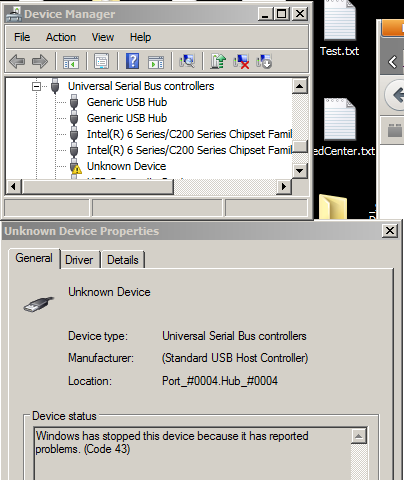
1. Unknown Device - PC recognized a USB device being attached but do not
know what kind.
2. No Action:
PC does not even a USB device is being attached.
3. Not in sync. PC recognized the Nano and allocated COM5. But when try to
upload a program, I receive the error message:
avrdude: stk500_getsync(): not in sync: resp=0x00

I will see what Banggood.com would do and report back. For now, just plan ahead and take the fail rate into your order and expecting 16% of your order could be bad.
========= Update 20150411 ========
Just got the replacement from Banggood. I am happy with their customer service.
This post is to report my experience with the failure rate of a particular product from a particular vendor - do not over interpret.
The product I evaluated is:
http://www.banggood.com/5Pcs-ATmega328P-Arduino-Compatible-Nano-V3-Improved-Version-With-USB-p-951782.html
The failure rate is 16% - 4 out of 25 Arduino nano board are bad.
* This board needs driver from:
http://wch.cn/downloads.php?name=pro&proid=5
Problems ranging from:
1. Unknown Device - PC recognized a USB device being attached but do not
know what kind.
2. No Action:
PC does not even a USB device is being attached.
3. Not in sync. PC recognized the Nano and allocated COM5. But when try to
upload a program, I receive the error message:
avrdude: stk500_getsync(): not in sync: resp=0x00
I will see what Banggood.com would do and report back. For now, just plan ahead and take the fail rate into your order and expecting 16% of your order could be bad.
========= Update 20150411 ========
Just got the replacement from Banggood. I am happy with their customer service.
Subscribe to:
Posts (Atom)